How to Turn Your Business Idea into a Mobile App: From MVP to Launch
Have a business idea that you want to turn into a mobile application? Whether you want to solve a customer problem, simplify business operations, launch a subscription-based product, or create a new digital service, turning an idea into a successful mobile app requires more than writing code.
You need to understand your target audience, validate demand, identify the features that matter most, select the right technology, design an intuitive user experience, and prepare the application for launch. Building everything at once can increase development costs and delay the opportunity to learn from real users.
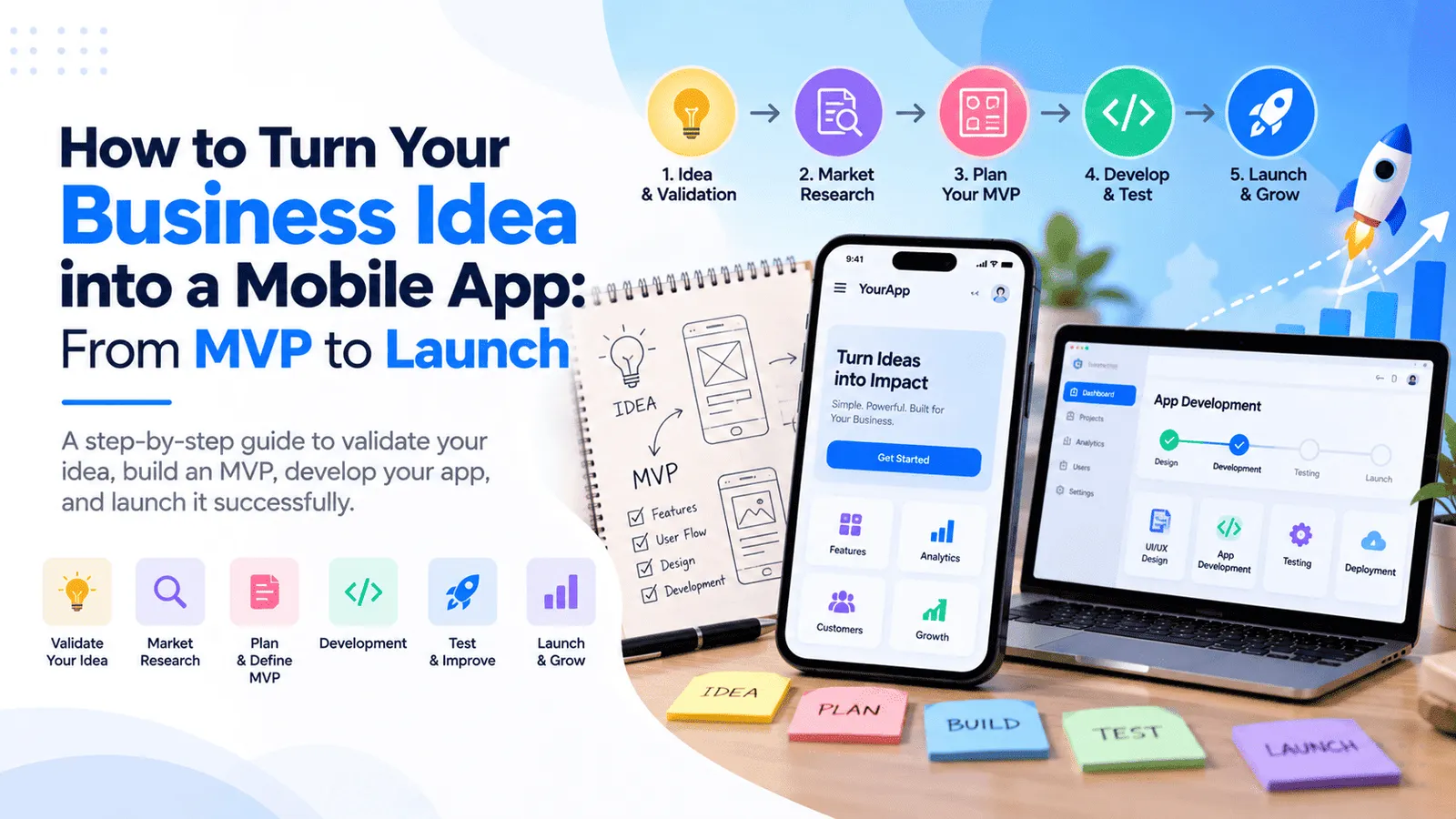
This is why many businesses begin with MVP app development. A minimum viable product (MVP) focuses on the essential functionality required to solve a specific problem and gather feedback before investing in a larger product.
In this guide, we explain how to turn a business idea into a mobile app, how to validate the idea, prioritize features, plan UI/UX design, choose the right development approach, estimate costs, test the product, and prepare for release on the Apple App Store and Google Play.
Step 1: Validate Your Mobile App Idea Before Development
Identify the Problem Your App Will Solve
Every successful mobile application needs a clear purpose. Before investing in development, identify the problem you want to solve and why people would choose your application instead of their existing alternatives.
For example, you might want to create an appointment booking app for service providers, a loan management application for lending businesses, a learning platform for students, a delivery app for local businesses, or a subscription-based productivity tool.
Each idea serves a different audience and requires different features, workflows, and business models. Defining the problem first helps you avoid spending development time on functionality that does not contribute to the product's main purpose.
Research Your Target Audience
Identify who will use the application, what challenges they currently face, and how they solve those problems today. Speak with potential customers, review competing applications, and study existing products in your industry.
Useful questions include:
Who is most likely to use this application?
What problem will the app solve for them?
How frequently will they need the solution?
What do existing apps do well, and what important problems remain unsolved?
Would customers pay for the solution, or will the business earn revenue through another model?
What would convince someone to try your app and continue using it?
Customer conversations and early research cannot guarantee demand, but they can help you identify assumptions that need to be tested before committing to a large development budget.
Study Competitors and Existing Alternatives
Research similar mobile applications, websites, and offline processes that your target customers already use. Examine their core features, user experience, pricing models, customer feedback, and common complaints.
The objective is not simply to copy another application. It is to identify a useful difference that gives customers a reason to choose your product.
For example, a booking app may focus on a specific local market, a business management app may simplify a complicated workflow, or an educational app may provide a more convenient learning experience for a particular audience.
Define a Clear Value Proposition
Your value proposition explains what your application does, who it serves, and why the solution is useful.
A practical format is to describe your target user, the main problem, and the outcome the application provides. This statement can guide feature prioritization, product design, marketing, and launch planning.
Before moving forward: Make sure you can explain the problem, intended audience, and main benefit of the app in a few clear sentences.
Step 2: Choose the Right Business Model
How Will Your Mobile App Generate Revenue?
If your application is intended to generate revenue, decide how the business model will work before finalizing its features.
Common options include:
Subscription model: Customers pay monthly or annually to access ongoing features or services.
One-time purchase: Users pay a single price to purchase the application or a defined product offering.
Commission-based model: The business earns a commission on bookings, transactions, or services completed through the platform.
Freemium model: Users access basic features for free and pay for advanced functionality.
Business-to-business model: Companies pay for software that supports employees, customers, workflows, or operations.
Advertising-supported model: Revenue is generated through advertising, where appropriate for the audience and product.
The right model depends on customer expectations, the value your app provides, operating costs, and the market you serve.
Payment implementation must also account for applicable platform policies. Digital goods and services, physical goods, subscriptions, and business payments can be subject to different rules depending on the distribution platform and region. Review the current requirements for your intended business model before implementation.
Calculate the Business Costs Beyond Development
A mobile app business may have costs for hosting, databases, payment processing, notifications, customer support, maintenance, marketing, analytics, and ongoing feature development.
Estimate these expenses alongside development costs so you can understand how much funding the business may need after launch.
For subscription applications, consider expected customer acquisition costs, conversion rates, subscription revenue, cancellations, and the cost of supporting each customer. For transactional products, estimate the operational cost and margin associated with each completed transaction.
Step 3: Define Your MVP Scope and Prioritize Features
What Is MVP App Development?
MVP app development is the process of building a minimum viable product containing the essential features needed to deliver the application's primary value and test it with real users.
An MVP is not simply an unfinished application. It should provide a coherent, usable experience that solves the core problem while avoiding unnecessary functionality that can be added later.
For example, an appointment booking MVP may include customer registration, service listings, available time slots, booking confirmation, and basic administration. Advanced loyalty programs, recommendations, complex analytics, and multiple integrations may be introduced after the initial product has been validated.
A focused MVP can help businesses gather customer feedback earlier, understand feature usage, and make more informed decisions about subsequent investment.
Separate Must-Have Features From Nice-to-Have Features
Every feature adds design, development, testing, and maintenance effort. Prioritizing features helps keep your first release focused on what users actually need.
Start by grouping proposed features into three categories:
Must-have features: Essential functionality without which the app cannot deliver its main value.
Should-have features: Useful improvements that can be included if budget and schedule permit.
Future features: Advanced capabilities that can wait until real customer feedback validates their importance.
For each proposed feature, consider its value to users, development effort, technical dependencies, and importance to the business model.
Examples of MVP Features by App Type
Food delivery app: Restaurant or menu listings, customer registration, cart, order placement, basic order status, and administration.
Education app: Student registration, course listings, lesson access, progress tracking, and basic administration.
Service booking app: Service listings, available slots, booking confirmation, customer information, and booking management.
Business management app: Authentication, core business records, dashboard, essential workflows, and basic reports.
SaaS mobile app: Account access, the product's main functionality, user settings, and appropriate subscription or account management features.
These are examples rather than fixed feature lists. Your MVP should reflect the needs of your target audience and the functionality required to validate your business model.
Avoid Building Every Feature in the First Release
Adding too many features can increase the budget, complicate the user experience, and delay the launch. It can also make it harder to identify which parts of the product create genuine value.
A better approach is to release a focused product, collect feedback, measure usage, and prioritize the improvements that solve the most important user problems.
Step 4: Create Wireframes and Design the User Experience
Why UI/UX Design Matters
UI/UX design helps transform your product requirements into an application that customers can understand and use comfortably.
User experience covers how people navigate the application and complete tasks. User interface design focuses on the visual presentation of screens, controls, typography, colors, layouts, and interactions.
Even an application with valuable functionality can struggle if users cannot understand how to register, find the main feature, complete a transaction, or recover from an error.
Create User Flows Before Designing Screens
Map the journey a user follows to complete the main task. For example, a booking application may guide customers from opening the app to selecting a service, choosing a time, confirming the booking, and receiving a notification.
Defining the steps helps identify missing screens, unnecessary interactions, and important decision points before development begins.
Build Wireframes
Wireframes are simplified layouts that show the structure of each screen without requiring a fully polished visual design.
They help you plan navigation, content hierarchy, form fields, buttons, dashboards, and key interactions before investing in detailed UI design.
Wireframes can also be used to review the product with stakeholders and potential users. Making changes at this stage is generally easier than restructuring screens after development has started.
Create a Consistent Visual Design
Once the main workflows are agreed upon, the design can be refined with typography, colors, icons, spacing, reusable components, and interaction states.
Design should remain consistent across screens and support accessibility, readability, and usability on different device sizes.
For applications serving both Android and iOS, the design should account for platform conventions while maintaining a consistent brand experience.
Validate the Design Before Development
Review prototypes with potential users or representative stakeholders. Ask them to complete common tasks and observe whether they understand the navigation and interface.
This feedback can help identify confusing labels, unnecessary steps, difficult forms, and missing functionality before engineering resources are committed.
Step 5: Choose the Right Mobile App Development Approach
Native Android and iOS Development
Native app development uses platform-specific technologies to create applications for Android or iOS.
This approach can be suitable when your app requires specialized platform capabilities, deep operating system integration, intensive device-specific optimization, or functionality that depends on native APIs.
However, building and maintaining separate native applications for both platforms can increase development and testing effort. The overall cost depends on the complexity of the product, reusable backend services, team structure, and platform-specific requirements.
Cross-Platform Development With React Native
React Native allows developers to build mobile applications for Android and iOS using JavaScript or TypeScript and a shared codebase for much of the application.
It can be an effective choice for businesses that want to launch on both platforms while sharing application logic, reusable components, and development resources.
React Native can be suitable for business applications, customer portals, booking systems, financial management tools, ecommerce experiences, and many other products.
However, platform-specific code or native modules may still be necessary for certain device capabilities and integrations. Cross-platform development does not automatically eliminate all separate platform testing or maintenance.
Mobile App vs. Web App
Before committing to mobile development, consider whether your target customers actually need an installable application.
A responsive web application may be sufficient for business dashboards, customer portals, administrative tools, and products that primarily require browser-based access.
A mobile app may be more appropriate when you need frequent on-the-go usage, specific device capabilities, or an experience designed around smartphone interactions. Some businesses benefit from both a web application and a mobile app connected to a shared backend.
Choose the platform based on user needs, technical requirements, budget, and the business outcome you want to achieve rather than assuming every idea needs both platforms from day one.
Plan the Backend and Database
Most business applications need a backend to handle authentication, user permissions, business logic, database operations, notifications, and integrations.
A suitable architecture may use Node.js and Express.js for backend APIs, PostgreSQL, MySQL, or MongoDB for data storage, and existing services for authentication, payments, messaging, or file storage where appropriate.
The technology stack should be selected according to the product's requirements, data structure, security, expected usage, and long-term maintenance needs. The backend should also be designed to support future features without introducing unnecessary complexity in the first release.
Step 6: Develop the Mobile App in Structured Phases
Phase 1: Set Up the Project and Architecture
The team establishes the development environment, application structure, code repository, configuration, authentication approach, database model, API conventions, and development workflow.
For applications with a backend, define how the mobile app will communicate with server services and how sensitive credentials, user sessions, and permissions will be managed.
Phase 2: Develop the Core Features
Implement the essential functionality identified during MVP planning. This may include registration, onboarding, dashboards, core workflows, data entry, search, and account management.
Build reusable components and keep business logic organized so the product can be maintained and extended as requirements evolve.
Phase 3: Integrate APIs and Third-Party Services
Depending on the product, integrations may include payment gateways, email delivery, push notifications, maps, authentication services, analytics, or existing business systems.
Each integration should be tested for successful responses, failed requests, timeouts, duplicate events, authentication errors, and appropriate recovery behavior.
For example, payment status should be confirmed through a trusted backend and verified provider events rather than assuming that the user interface alone proves a transaction succeeded.
Phase 4: Implement Security and Error Handling
Security should be built into the application from the beginning. Requirements may include secure authentication, authorization checks, input validation, encrypted connections, safe storage practices, rate limiting, and protected API access.
Also plan how the application handles expired sessions, weak connectivity, failed requests, invalid forms, unexpected responses, and service outages.
Phase 5: Review the Application Against the MVP Scope
Before moving into final testing, verify that every essential feature from the agreed scope has been implemented and that the main user journeys work as expected.
Review the application against the original acceptance criteria and identify any missing features, incomplete integrations, or important usability issues before release preparation.
Step 7: Test the Application Before Launch
Functional Testing
Functional testing checks whether the application behaves according to its requirements. Test registration, login, navigation, forms, business calculations, notifications, payments, and any other essential functionality.
Testing should include normal use, invalid inputs, boundary cases, interrupted requests, and scenarios where external services fail.
Usability and Device Testing
Test the app across the supported devices, screen sizes, and operating system versions identified for your target audience.
Check navigation, keyboard behavior, scrolling, permissions, accessibility, layout consistency, and the behavior of the interface under different network conditions.
API and Integration Testing
Verify that frontend screens and backend services exchange information correctly. Test authentication, authorization, data validation, error responses, timeouts, and integration behavior.
Where multiple systems share information, confirm that data remains consistent and that failed operations do not create duplicate records or unexpected transactions.
Performance and Security Testing
Assess loading times, responsiveness, resource usage, and backend performance under expected workloads. Review security-sensitive functionality such as authentication, access control, file uploads, and API endpoints.
The level of testing should match the application's risks. Financial, healthcare, identity-related, or other sensitive applications may require more extensive security and operational assessments.
Beta Testing With Real Users
Before public release, distribute a test build to a controlled group of users where appropriate. Observe how they use the application, collect feedback, and identify problems that were not apparent during internal testing.
Prioritize issues that affect the main user journey, crash stability, data correctness, security, and the ability to complete important tasks.
Beta testing is not simply a final formality. It is an opportunity to confirm that the product works in realistic conditions before a wider launch.
Step 8: Prepare for Google Play and Apple App Store Launch
Prepare Your App Store Listing
Publishing a mobile app requires more than submitting the application binary. Prepare the app name, description, icon, screenshots, supported device information, category, privacy details, and other metadata required by the distribution platform.
Store descriptions should explain the value of the application accurately and help users understand its core functionality.
Confirm that all content, navigation, links, backend services, and customer support information are ready before submitting the app for review.
Publishing on Google Play
Google Play Console provides tools for testing releases, collecting feedback, and distributing an application to users.
Before production release, verify the current testing, target audience, content rating, data safety, app signing, and store listing requirements applicable to your application and developer account.
Some newer personal developer accounts are subject to specific closed-testing requirements before they can apply for production access. For example, Google documents a requirement for eligible personal accounts created after November 13, 2023, to complete a closed test with at least 12 testers opted in continuously for 14 days before applying for production access. Check the official Google Play testing requirements for the rules that apply to your account.
Publishing on the Apple App Store
Apple App Store distribution involves preparing the application in App Store Connect, completing the required metadata, and submitting the app for review.
Before submission, test the app for crashes, finalize content, verify links, provide required privacy information, and ensure the backend services are accessible during review.
If the app requires an account, reviewers may need appropriate demo credentials or a suitable demo mode, along with any necessary review instructions.
Review the current Apple App Review Guidelines and prepare the submission according to the requirements applicable to your app and business model.
Plan for Review Feedback
App store review is not guaranteed to succeed on the first submission. A submission may require clarification, additional information, or changes to meet platform requirements.
Allow time to respond to review feedback, correct issues, upload a revised build if necessary, and verify the final release.
Review timelines and testing requirements can vary, so avoid promising customers a fixed launch date based only on the date when the app is submitted.
Set Up Analytics and Crash Monitoring
Before launch, decide how you will monitor crashes, performance, onboarding completion, feature usage, and important business events.
Use appropriate analytics and monitoring tools while respecting applicable privacy requirements and user consent obligations.
These signals help you understand whether customers are successfully using the product and where improvements may be needed after launch.
Step 9: Launch Your Mobile App and Attract Your First Users
Create a Launch Plan
Launching an app involves more than making it available in an app store. You also need a plan to reach the right audience, explain the product's value, onboard customers, and collect feedback.
Depending on the business, the launch plan may include:
A landing page explaining the app and its benefits.
Search engine optimization and useful educational content.
Email announcements to an interested audience.
Relevant social media and community outreach.
Partnerships with businesses that serve your target market.
Paid advertising with a clearly defined acquisition budget.
Customer onboarding, product demonstrations, and support resources.
Choose marketing channels based on how your target users discover solutions. A business application aimed at company decision-makers may require a different acquisition strategy from a consumer app designed for frequent personal use.
Track Meaningful Product Metrics
Measure the metrics that reflect your business objectives rather than focusing only on downloads.
Useful metrics may include registration completion, onboarding success, activation, repeat usage, retention, conversion to paid plans, transaction completion, support requests, and customer acquisition cost.
For a booking app, the key metric may be completed bookings. For a subscription product, activation, paid conversion, retention, and cancellation rates may be more informative.
Review these indicators alongside customer feedback to identify which features are valuable and where users encounter difficulties.
Plan Improvements After Launch
Your first release should provide a foundation for learning. Review feedback, fix problems, improve confusing workflows, and prioritize enhancements based on observed user needs.
Not every customer request needs to become a new feature. Focus on improvements that support the product's goals, address recurring difficulties, and deliver measurable value.
Continuous improvement helps turn an initial MVP into a more mature product without requiring every future capability to be developed before the first launch.
How Much Does It Cost to Build a Business Mobile App in 2026?
Mobile App Development Cost in India
The cost of building a business app depends on the number of features, design complexity, supported platforms, backend requirements, integrations, security, testing, and release scope.
The following ranges are indicative planning estimates for development in India rather than fixed market prices.
Basic mobile app: ₹2 lakh–₹5 lakh. Suitable for a focused application with straightforward screens, limited features, and relatively simple backend requirements.
Business app MVP: ₹5 lakh–₹12 lakh. May include authentication, a dashboard, core workflows, backend APIs, and selected integrations.
Feature-rich business app: ₹12 lakh–₹25 lakh. May include multiple user roles, payments, push notifications, reports, complex workflows, and third-party integrations.
Complex mobile platform: ₹25 lakh–₹50 lakh or more. May include advanced business logic, extensive integrations, high-volume operations, sophisticated security, or complex real-time capabilities.
A narrowly scoped product may cost less than these ranges, while an application with complex integrations or demanding security requirements may cost more.
What Affects the Development Budget?
Number of features: Every additional screen, workflow, integration, and business rule adds implementation and testing effort.
Platform choice: Native development for Android and iOS may require more duplicated work than a suitable cross-platform approach.
UI/UX design: Research, custom design systems, complex visualizations, and usability testing affect the design budget.
Backend and database: Authentication, data models, API development, reporting, and business logic can represent a significant portion of the total cost.
Third-party integrations: Payment gateways, messaging platforms, maps, identity providers, and external business systems introduce additional requirements.
Security and testing: Sensitive data, high-risk workflows, performance requirements, and compliance needs can increase testing and implementation effort.
Maintenance and support: Hosting, updates, troubleshooting, operating system compatibility, and future enhancements add to the total cost of ownership.
Do Not Forget Post-Launch Expenses
In addition to development, budget for hosting, databases, file storage, notifications, payment processing, analytics, customer support, maintenance, and future improvements.
Mobile applications often require ongoing compatibility testing and release management as operating systems, devices, libraries, and store requirements change.
Request a clear project estimate that separates one-time development costs from recurring infrastructure expenses and future feature development.
How to Reduce Mobile App Development Cost Without Sacrificing Quality
1. Validate Demand Before Committing to a Large Build
Talk to potential users, review competitors, and test the problem using interviews, prototypes, or a small pilot where appropriate. This helps reduce the risk of investing in a product without a clear target audience.
2. Build a Focused MVP
Start with the essential functionality needed to provide value. Move advanced reports, complex personalization, secondary platforms, and nonessential integrations to later releases unless they are required to validate the business model.
3. Reuse Suitable Components and Services
Established UI components, authentication services, supported APIs, and reusable application modules can reduce development effort. Reuse should still meet security, accessibility, maintainability, and performance requirements.
4. Choose an Appropriate Technology Stack
React Native may be suitable for cross-platform mobile applications, while an existing backend can sometimes be extended rather than replaced. Choose technologies based on requirements and team expertise, not only initial cost.
5. Define Requirements and Acceptance Criteria Early
Agree on the features, deliverables, supported platforms, testing expectations, and launch requirements before development begins. Clear requirements reduce unnecessary rework and make it easier to manage changes.
6. Test Frequently
Frequent testing can expose issues while the relevant features are still being developed. Fixing problems early can reduce the impact of integration failures and avoidable changes near launch.
7. Plan Future Releases Instead of Building Everything Now
A phased roadmap allows your business to prioritize improvements using customer feedback and product metrics. This can reduce the initial investment and help ensure later development is guided by actual demand.
How to Choose the Right Mobile App Development Company
What Should You Look for in a Development Partner?
Choosing a mobile app development company is an important decision because the development partner can influence product quality, architecture, security, delivery time, and long-term maintenance.
Before selecting a team, consider the following questions:
Can the team help validate your requirements and define a practical MVP scope?
Have they developed applications with similar workflows, features, or integrations?
Can they explain the trade-offs between native development, React Native, and a web application?
Does the proposal clearly define deliverables, exclusions, milestones, and acceptance criteria?
Are UI/UX design, testing, deployment, store submission support, and documentation included?
Who will own the source code, repository, production accounts, and third-party subscriptions?
What maintenance and support options are available after launch?
Compare proposals based on the complete scope rather than the headline price. A reliable development partner should explain the recommended approach, identify project risks, and clarify the responsibilities involved in launching and maintaining the app.
At MT TechnoSoft, we help businesses turn product ideas into custom mobile applications, business management tools, customer portals, and connected web and mobile experiences.
Our development approach focuses on understanding your business objectives, prioritizing useful features, choosing appropriate technologies, and creating maintainable applications that can evolve with your customers and business requirements.
Frequently Asked Questions About Mobile App Development
How do I turn my business idea into a mobile app?
Start by defining the problem your app will solve and validating demand with potential users. Identify your target audience, prioritize the MVP features, create wireframes, choose an appropriate technology stack, develop and test the application, and prepare for app store submission. After launch, use customer feedback and product metrics to guide improvements.
What is MVP app development?
MVP app development focuses on building the smallest useful version of an application that delivers its core value. It allows businesses to test the idea with real users, gather feedback, and validate demand before investing in additional features.
How much does it cost to build a business app in India?
Indicative development budgets may range from ₹2 lakh–₹5 lakh for a basic application, ₹5 lakh–₹12 lakh for a business MVP, and ₹12 lakh–₹25 lakh for a feature-rich app. More complex platforms can cost ₹25 lakh or more. The actual price depends on the features, technology, platforms, integrations, and testing requirements.
How long does mobile app development take?
A focused MVP may take approximately 8–14 weeks, while a more complex business app can require several months or longer. Timelines depend on the number of features, design requirements, backend development, integrations, testing, and app store review.
Should I build an MVP or a complete mobile application first?
An MVP is often a practical starting point when you are validating a new idea or entering a market with uncertain demand. It focuses on essential features and provides an opportunity to collect feedback. A more complete application may be appropriate when requirements are well established and the business case justifies the larger investment.
Should I choose React Native or native Android and iOS development?
React Native can be suitable when you want to share much of the application code across Android and iOS. Native development may be more appropriate for certain platform-specific features, specialized performance requirements, or deeper operating system integration. The decision should reflect your actual product requirements and maintenance plans.
Can I use the same backend for my mobile app and web application?
Yes. A shared backend can manage authentication, business logic, databases, and APIs used by both the mobile application and web application. Each frontend can provide an experience suited to its users, while shared services can help avoid duplicating business logic.
Do I need a separate app for Android and iOS?
You need builds and release preparation appropriate for the platforms you intend to support, but the codebase does not always need to be completely separate. React Native and other cross-platform approaches can share much of the application code, while native development uses platform-specific implementations.
What is required to publish a mobile app on Google Play and the Apple App Store?
You generally need the required developer account, production-ready app builds, store metadata, screenshots, appropriate privacy information, and compliance with the applicable platform policies. Testing, review information, and account-specific testing requirements may also apply. Always check the latest Google Play Console and Apple App Store submission guidance before release.
Can a mobile app be updated after launch?
Yes. You can release improvements, bug fixes, and additional features after launch. Changes to application code usually require appropriate builds and releases, while some content and backend changes can be deployed independently. Updates should be tested and distributed according to the requirements of each platform.
How can I make my mobile app successful after launch?
Success depends on solving a real problem, providing a good user experience, reaching the right audience, and continuously improving the product. Track meaningful metrics such as activation, retention, task completion, customer feedback, and paid conversion where relevant. Use these insights to prioritize future improvements.
How do I choose the right mobile app development company?
Look for a team that understands your business requirements, can help define an MVP, explains technology trade-offs, provides transparent estimates, and includes testing and launch planning. Clarify source code ownership, delivery milestones, maintenance arrangements, and third-party costs before starting the project.
Ready to Turn Your Business Idea Into a Mobile App?
Building a successful mobile app starts with a clear business problem, a well-defined audience, and a focused set of features. You do not need to develop every planned capability before launch. A carefully scoped MVP can help you test the idea, learn from actual customers, and build the next version with greater confidence.
Whether you are planning a customer-facing application, a business management tool, a booking platform, or a new subscription-based product, the right development approach should reflect your goals, budget, technology requirements, and plans for future growth.
MT TechnoSoft can help you evaluate your idea, define the initial scope, plan the user experience, and explore the development approach that suits your business.
Ready to discuss your mobile app idea? Contact MT TechnoSoft to discuss your requirements, explore MVP app development, and plan your journey from concept to launch.