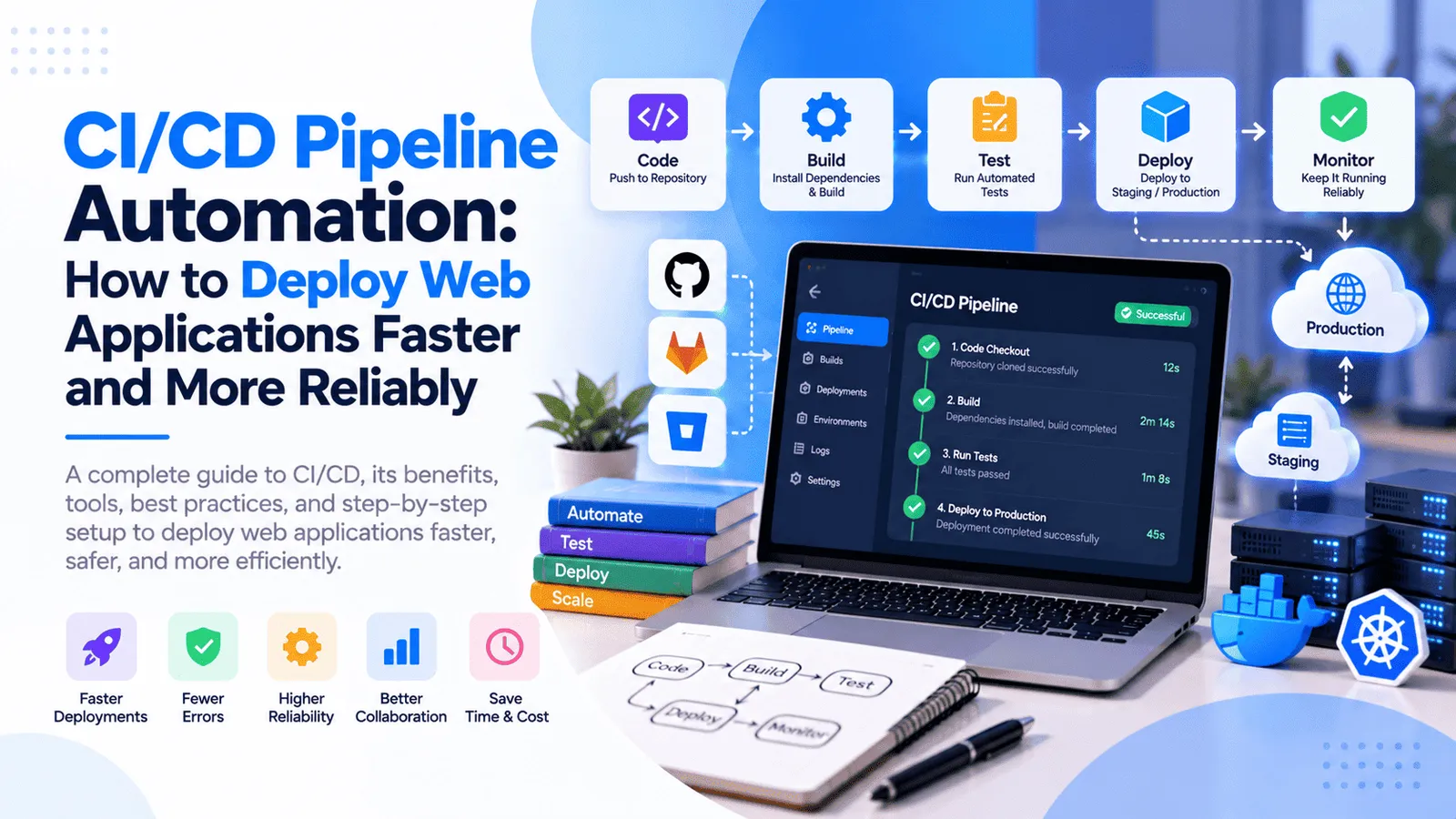
CI/CD Pipeline Automation: How to Deploy Web Applications Faster and More Reliably
Deploying a web application should not require manually connecting to a server, uploading files, installing dependencies, restarting services, and hoping everything works correctly. Yet many businesses still rely on manual deployment processes that consume engineering time and introduce avoidable risks.
As applications grow, frequent releases become more difficult to manage. A small configuration mistake, a failed database migration, an inconsistent server environment, or an untested code change can cause downtime and disrupt the customer experience.
CI/CD pipeline automation helps solve these problems by automating important parts of the software delivery process, including code validation, automated testing, application builds, containerization, and deployment. Combined with Docker, GitHub Actions, and appropriate monitoring, a well-designed pipeline can make releases more consistent and reduce repetitive operational work.
For businesses operating customer portals, SaaS platforms, ecommerce applications, APIs, and mobile app backends, automated deployment can improve the reliability of software delivery and free developers to focus on product development.
In this guide, we explain what CI/CD is, how automated deployment works, how Docker and GitHub Actions fit into a pipeline, which security practices matter, and how to implement a practical CI/CD solution for your web application.
What Is CI/CD Pipeline Automation?
Understanding Continuous Integration and Continuous Delivery
CI/CD stands for Continuous Integration and Continuous Delivery or Continuous Deployment. It describes a set of software engineering practices that help teams validate code changes and move software through the release process using repeatable workflows.
Continuous Integration (CI) automatically builds and checks code changes when developers push code or open pull requests. Depending on the project, these checks may include linting, type checking, unit tests, integration tests, dependency checks, and production builds.
Continuous Delivery (CD) extends this process by preparing a validated application for release. The application may be deployed automatically to testing or staging environments, while production deployment requires an authorized approval.
Continuous Deployment goes a step further by automatically releasing every change that successfully passes the configured pipeline and release conditions into production.
These approaches are related, but they are not identical. Continuous delivery can include a manual production approval, while continuous deployment releases qualifying changes automatically.
What Does a CI/CD Pipeline Do?
A CI/CD pipeline is an automated sequence of steps that moves a code change from a source repository through validation, packaging, and deployment.
A typical web application pipeline may perform the following activities:
Detect a new code change in a Git repository.
Install dependencies using the project's lockfile.
Run linting, TypeScript checks, and automated tests.
Build the application and identify compilation errors.
Build a Docker image when the application uses containers.
Publish the image to a container registry.
Deploy the validated release to staging or production.
Run health checks and report deployment results.
Not every project requires every step. A small static website may need a simpler pipeline than a multi-service SaaS product with a database, background workers, and several environments.
The goal is to automate the checks and operations that matter for your application's risk, architecture, and release requirements.
Why Businesses Need CI/CD Automation
1. Reduce Manual Deployment Work
Manual deployment often involves repeating the same commands whenever a new version is ready. Developers may need to connect to a server, pull source code, install packages, build the application, update configuration, restart processes, and verify the result.
A CI/CD pipeline can automate these repeatable steps. Once configured properly, a developer can push a change and allow the workflow to validate, package, and deploy the application according to the project's release rules.
This reduces repetitive work and makes the release process less dependent on someone remembering every command or configuration change.
2. Reduce Deployment Errors
Manual processes can introduce mistakes such as running an incorrect command, deploying the wrong branch, forgetting an environment variable, or restarting a service before a build has completed successfully.
Automated workflows execute predefined steps consistently. Combined with protected branches, validated configuration, automated tests, and deployment health checks, they help reduce the chance that common operational mistakes reach production.
Automation does not eliminate all failures. Pipelines must be designed, tested, monitored, and maintained to handle unexpected conditions safely.
3. Release Features More Frequently
When each release requires several manual steps, developers may delay deployments and bundle multiple changes together. This can make it more difficult to identify which change caused a problem.
CI/CD makes smaller and more frequent releases practical by automating repeatable validation and deployment tasks. Smaller releases can simplify troubleshooting and help businesses deliver improvements to customers more consistently.
4. Improve Software Quality
Automated testing can identify problems before an application is released. For example, a pipeline can verify that critical business logic, API responses, authentication flows, and application builds behave as expected.
When required checks fail, the pipeline can stop the release rather than continuing to deploy a change that has not passed validation.
The quality benefit depends on the usefulness of the tests. A pipeline that only builds an application cannot guarantee that every business workflow works correctly.
5. Improve Team Collaboration
Development teams can use a shared pipeline to establish consistent rules for code review, testing, builds, and deployment. Everyone works within a documented release process instead of relying on individual deployment habits.
Pipeline logs and status checks also make it easier to identify failed steps, review changes, and investigate deployment problems.
6. Support Business Growth
As an application grows, releases may involve more developers, additional services, multiple environments, and more complex integrations. A repeatable deployment process helps manage this complexity.
CI/CD can support multiple applications, backend APIs, background workers, and containerized services as long as the pipeline is designed around their dependencies and operational requirements.
For growing businesses, this creates a more consistent foundation for maintaining and extending digital products.
CI vs. Continuous Delivery vs. Continuous Deployment
Continuous Integration (CI)
CI focuses on integrating code changes frequently and checking them automatically. Each relevant change can trigger a workflow that installs dependencies, checks code quality, runs tests, and builds the application.
For example, when a developer opens a pull request in a Next.js project, the pipeline can run ESLint, TypeScript checks, automated tests, and a production build. If a required check fails, the team can fix the problem before merging the change.
Continuous Delivery (CD)
Continuous Delivery extends CI by keeping the application ready for deployment. A successful build can be packaged, stored as a release artifact or container image, and deployed to a staging environment for further validation.
The production release may require manual approval, a scheduled release window, or another explicit authorization step.
Continuous Deployment
Continuous Deployment automatically releases changes that meet the required validation and deployment conditions. It can be suitable for teams with mature automated tests, controlled rollout procedures, and reliable monitoring.
For applications that handle financial transactions, sensitive information, or business-critical operations, a team may prefer Continuous Delivery with controlled production approval until its testing and operational processes are sufficiently mature.
Which approach should you choose? Most businesses should begin by automating code checks and builds, then introduce automated staging deployments. Production deployment can become more automated as the team's confidence in testing, security, rollback procedures, and monitoring improves.
How a CI/CD Pipeline Works Step by Step
Step 1. Developers Push Code to Git
Developers work on separate branches and submit changes through pull requests. GitHub or another supported source control platform stores the repository and maintains a history of code changes.
A pipeline can be configured to run when developers open or update a pull request, push to a designated branch, create a release tag, or initiate an approved manual workflow.
Using pull requests and branch protection helps teams review changes before merging them into the primary branch.
Step 2. Install Dependencies and Validate the Code
The CI workflow installs dependencies using the project's package manager and lockfile, helping make the build more reproducible.
For a React.js or Next.js application, automated checks may include ESLint, TypeScript validation, unit tests, and production builds. A Node.js backend may also require API tests, database-related integration tests, and verification of critical business logic.
If an essential check fails, the pipeline should report the failure and prevent the affected change from progressing to the next stage.
Step 3. Run Automated Tests
Automated tests help verify that the application behaves as expected before deployment. Unit tests check individual functions, integration tests verify that components work together, and end-to-end tests exercise complete user journeys where appropriate.
For example, a business application might test authentication, payment status handling, role-based permissions, data validation, and important API workflows.
Testing should focus on realistic failure cases as well as successful scenarios. The goal is to catch defects that would otherwise be discovered by customers or production monitoring.
Step 4. Build the Application
After the required checks pass, the pipeline builds the application or creates a releasable artifact.
For a Next.js application, this may involve generating the production build using the project's configured build command. A backend service may require compilation, packaging, or preparation of runtime assets.
Build failures should stop the pipeline. A deployment should not proceed if the application cannot be packaged successfully.
Step 5. Build and Publish a Docker Image
When the application uses Docker, the pipeline can build a container image that includes the application and its required runtime dependencies.
The image can then be published to a container registry, such as GitHub Container Registry, or another suitable registry. The deployment environment pulls the approved image and runs the application using its configured production settings.
Using a tested image helps reduce differences between development, testing, and production environments. Environment-specific configuration and secrets should remain outside the image where appropriate.
Step 6. Deploy to Staging or Production
After packaging, the pipeline deploys the selected release to the intended environment.
A staging environment allows the team to verify the application before production release. Production deployment can use an approved process that updates the running application, applies compatible database changes, and checks that required services are available.
The deployment strategy depends on your hosting platform and architecture. A Dockerized application on a virtual private server may use a registry and a controlled server deployment script, while a managed cloud environment may use its native deployment services.
Step 7. Run Health Checks and Monitor the Release
A successful deployment command does not necessarily mean the application is functioning correctly. The pipeline or release process should verify that the application starts, responds to health checks, and can reach essential dependencies.
After release, application logs, error monitoring, uptime checks, and infrastructure metrics can help detect problems. Where appropriate, automated alerts can notify the team when a deployment fails or application health deteriorates.
If the new release causes problems, a documented recovery procedure should help restore a known-good version safely.
How GitHub Actions Automates CI/CD
What Is GitHub Actions?
GitHub Actions is a workflow automation platform that allows teams to run jobs in response to repository events or manual triggers. Workflows are commonly defined in YAML files inside the repository's .github/workflows directory.
A workflow can contain multiple jobs and steps to run commands, execute automated tests, build artifacts, interact with external services, and deploy an application.
GitHub Actions is useful for web application development because the CI/CD workflow can be maintained alongside the code it builds and deploys.
Example: CI/CD for a Next.js Application
A typical Next.js workflow may run when a pull request is created or code is pushed to the main branch.
Check out the repository.
Set up the required Node.js version.
Install dependencies using the package lockfile.
Run linting and TypeScript checks.
Run automated tests where configured.
Build the production application.
Build and publish a Docker image when the project uses containers.
Deploy an approved release to the configured environment.
The precise workflow will vary according to your package manager, application framework, test suite, hosting environment, and deployment strategy.
Example: CI/CD for a Node.js Backend
A Node.js backend pipeline can use similar checks while adding tests relevant to API behavior, authentication, data validation, database interactions, and background jobs.
Where integration tests require a database or another service, the workflow can start suitable test dependencies and use isolated test data. Production database credentials should never be used for ordinary automated test runs.
Why Keep the Pipeline in the Repository?
Version-controlled workflow files allow teams to review pipeline changes, track revisions, and maintain a shared record of the release process.
Changes to deployment configuration can be reviewed like application code. This makes it easier to identify when a pipeline changed and why a release behaves differently.
Use maintained actions, pin dependencies according to your security and update policy, restrict workflow permissions, and review third-party actions before granting them access to sensitive resources.
Learn More About GitHub Actions
For workflow syntax, supported triggers, jobs, runners, environments, and reusable workflows, review the official GitHub Actions documentation.
How Docker Improves Automated Deployment
What Is Docker?
Docker is a containerization platform that packages an application and its runtime dependencies into a container image. The image can be used to create containers in suitable environments.
For web applications, Docker can help standardize how the application is built and started across development, testing, and production.
For example, a Next.js application or Node.js API can be packaged into an image and run with a consistent runtime setup, reducing reliance on manual server configuration.
Why Use Docker in a CI/CD Pipeline?
Consistent deployment artifacts: The pipeline can build a versioned image from a specific code revision and promote that image through the release process.
Repeatable environments: The application can run with its declared runtime dependencies, while environment-specific configuration is supplied separately.
Simpler release management: A deployment can use a particular image tag or immutable image digest instead of rebuilding application code directly on the production server.
Improved rollback options: Keeping known-good images available can help restore a previous release when the deployment architecture supports safe rollback.
More predictable runtime setup: Containers help standardize application startup, although the host operating system, networking, storage, permissions, external services, and configuration still need to be managed correctly.
How a Docker-Based Deployment Works
A common workflow begins when a developer pushes an approved code change. GitHub Actions runs the required checks, builds the Docker image, and publishes it to a container registry.
The deployment environment then authenticates to the registry, retrieves the intended image, configures runtime environment variables, and starts the updated container using the deployment procedure.
After startup, health checks confirm that the service is available. If the check fails, the release process should report the problem and follow the recovery procedure defined for the application.
What About Environment Variables and Secrets?
Docker images should not contain production passwords, API keys, private certificates, or other sensitive values. Build artifacts can be stored and shared across environments, while secrets and environment-specific configuration are injected through controlled deployment settings.
For example, a production application may need database credentials, payment provider keys, authentication secrets, and external service configuration. These values should be managed through protected environment settings or an appropriate secrets management service.
Files uploaded by users and other persistent application data should also be stored using a suitable persistent storage solution rather than relying on the writable layer of a disposable container.
Review the official Docker documentation for container images, Dockerfiles, registries, runtime configuration, and deployment practices.
Automated Testing: The Foundation of Reliable Releases
Why Build Success Alone Is Not Enough
A production build verifies that the application can be packaged according to the build configuration. It does not prove that all user workflows, integrations, security controls, or business rules work correctly.
Automated tests add additional safeguards by checking application behavior before a release is approved.
Unit Testing
Unit tests validate individual functions and components in isolation. They are useful for business calculations, formatting logic, validation rules, helper functions, and other small units of behavior.
For example, a lending application might test interest calculations, repayment schedules, or date handling using defined inputs and expected results.
Integration Testing
Integration tests verify interactions between components, such as backend APIs and databases, authentication middleware, payment webhooks, or background job processors.
These tests can reveal issues that do not appear when components are tested separately.
End-to-End Testing
End-to-end tests exercise complete user journeys through the application. They can verify important flows such as registration, sign-in, order placement, booking confirmation, or report generation.
Because end-to-end tests can take longer and may be more sensitive to environment changes, focus on critical business journeys rather than trying to automate every possible interaction.
Dependency and Security Checks
Automated dependency checks can identify known vulnerabilities in application packages. Additional checks may review exposed secrets, container images, source code, and infrastructure configuration.
Security tooling should be selected according to the application's risk profile and maintained as part of the development process. Passing an automated scan does not guarantee that an application is secure.
Define Quality Gates Before Deployment
A quality gate defines the conditions that must be met before a change can proceed to the next stage. For example, a pipeline may require a successful production build, passing critical tests, approved code review, and completion of security checks.
Use required checks to stop known failures from progressing. At the same time, keep the pipeline understandable and reliable so developers can identify and resolve problems without unnecessary friction.
Choosing the Right Deployment Strategy
1. Rolling Deployment
A rolling deployment replaces application instances gradually rather than updating every instance simultaneously. It can reduce the disruption associated with deploying a new version when the platform supports this strategy.
Rolling updates require compatibility between old and new versions during the transition, especially when requests, database schemas, or background jobs are involved.
2. Blue-Green Deployment
Blue-green deployment maintains two environments or sets of application instances. One serves the current production release, while the other is prepared with the new version.
After validating the new release, traffic can be switched to the updated environment. If a problem occurs, the system may be able to switch back, provided the application architecture and data changes allow it.
This approach can improve release control, but it may require additional infrastructure and careful handling of database changes, sessions, file storage, and other shared resources.
3. Canary Deployment
A canary deployment initially exposes the new release to a limited portion of traffic or a selected user group. The team evaluates its health and behavior before increasing the rollout.
Canary releases can reduce the number of users affected by certain defects, but they require suitable traffic routing, monitoring, and a clear response plan if errors increase.
Which Deployment Strategy Should You Use?
A small application hosted on a virtual private server may only need a controlled container update with health checks and a recovery procedure.
A high-traffic platform with multiple application instances may benefit from rolling or blue-green deployments. Canary deployment can be useful when teams have the infrastructure and monitoring needed to evaluate releases gradually.
Choose the simplest deployment strategy that satisfies your availability, risk, infrastructure, and recovery requirements. More sophisticated strategies introduce additional operational complexity and are not automatically necessary for every project.
CI/CD Security Best Practices
Protect Deployment Secrets
Store server credentials, registry tokens, cloud credentials, and API keys in protected secret storage supported by your CI/CD platform or deployment environment.
Do not commit production secrets to source control, print them into workflow logs, or place them inside Docker images. Rotate credentials when they are exposed or no longer need to remain active.
Use Least-Privilege Permissions
Workflows should receive only the permissions necessary to perform their jobs. For example, a test workflow generally does not need permission to modify production infrastructure.
Separate build permissions from production deployment permissions where appropriate, restrict access to deployment environments, and use short-lived credentials or workload identity mechanisms when supported.
Protect the Production Branch
Use pull requests, required status checks, code review, and branch protection to reduce the risk of unreviewed changes reaching production.
Limit who can approve deployments and update production configuration. For sensitive projects, require explicit authorization before a workflow deploys to the production environment.
Secure Third-Party Workflow Actions
Review third-party actions and their maintenance status before using them in a deployment workflow. Follow a clear policy for action versions, dependency updates, and permissions.
Where appropriate, pin actions to a reviewed full commit SHA and update those references through a controlled process. This helps reduce the risk of an unexpected upstream action change affecting a release.
Scan Dependencies and Container Images
Use suitable checks to identify known vulnerabilities in application dependencies and container images. Keep base images and packages updated, remove unnecessary tools from production images, and rebuild artifacts when important security fixes become available.
Separate Environments and Test Data
Development, testing, staging, and production environments should have appropriate configuration and access boundaries.
Use isolated test data for automated tests and avoid exposing production records to development pipelines unnecessarily. Production credentials and data should remain protected throughout the release process.
Database Migrations and Rollback Planning
Why Database Changes Need Special Attention
A deployment may update application code and database schema. If the new code expects a database column that does not exist, or an old application version is incompatible with a newly changed schema, the release can fail even when the application build succeeds.
Database migrations should be version-controlled, tested, and applied in a controlled sequence. For applications that need uninterrupted service, a staged approach can introduce compatible schema changes before deploying code that depends on them.
Use Backward-Compatible Changes Where Possible
A safer approach for many applications is to add new schema elements first, deploy code that can work with both old and new structures, migrate data if required, and remove obsolete fields in a later release.
This approach is not suitable for every change, but it can reduce the risk of breaking a running application during deployment.
Define a Recovery Procedure
Container rollback can restore a previous application image, but it cannot automatically reverse every database change or undo transactions that have already occurred.
Recovery planning should consider code rollback, database compatibility, backups, data restoration, background jobs, external side effects, and how the team will verify the recovered application.
Test recovery procedures before relying on them during an incident. A backup is useful only when it can be restored within the recovery requirements of the business.
How to Set Up a CI/CD Pipeline for a Web Application
Step 1. Review Your Existing Deployment Process
Document how the application is currently built, tested, configured, and deployed. Identify the commands people run manually, the required environment variables, the services that need restarting, and the steps used to verify a release.
For an existing Next.js and Node.js project, this may include the package manager, production build process, server or container configuration, database migrations, reverse proxy, persistent file storage, and domain configuration.
Step 2. Standardize the Build
Make sure the project can be built reliably using documented commands and a supported dependency lockfile. Confirm that linting, type checking, tests, and production builds can run in an automated environment.
Resolve environment-specific assumptions that cause builds to behave differently on individual developer machines and the CI runner.
Step 3. Create the CI Workflow
Add a workflow that runs when code is pushed or a pull request is opened. Start with dependency installation, linting, type checking, automated tests, and a production build.
Use required status checks so important failures block merging into the protected release branch.
Step 4. Add Docker Packaging if Appropriate
Create and review a Dockerfile that builds the application using the required dependencies and produces a suitable runtime image.
Use a suitable base image, avoid copying unnecessary files into the final image, keep sensitive configuration outside the image, and ensure the application can run with the required permissions.
For containerized deployment, configure the runtime environment, networking, health checks, and persistent storage according to the application's requirements.
Step 5. Configure the Container Registry
Configure the pipeline to authenticate to the chosen container registry and publish the image after the required checks succeed.
Use meaningful release tags tied to the source revision or release identifier. For production deployment, prefer an identifiable immutable artifact rather than relying exclusively on a mutable tag such as latest.
Step 6. Configure Staging and Production Deployment
Set up a staging environment where a candidate release can be verified before production. Store the required credentials and environment configuration securely, and restrict which workflows can access production deployment permissions.
Automate deployment using the mechanisms supported by your hosting environment. This may involve a controlled SSH workflow, a deployment API, a container orchestration platform, or a managed cloud deployment service.
Keep deployment logic idempotent where practical, handle failures explicitly, and avoid deleting the current working release before the new one has passed the required checks.
Step 7. Add Health Checks and Release Verification
After deployment, verify that the application starts, responds to health checks, and can access required dependencies. Where appropriate, run a small set of smoke tests against the deployed environment.
Report failures clearly and alert the responsible team. Define what should happen if the deployment command succeeds but the application fails its health checks.
Step 8. Monitor and Improve the Pipeline
Track how long builds take, how frequently workflows fail, how often releases require recovery, and how much time developers spend resolving pipeline issues.
Use these measurements to identify opportunities for caching dependencies, parallelizing independent tests, simplifying workflows, improving test reliability, and removing unnecessary manual steps.
Pipeline automation should improve delivery confidence, not simply increase the number of workflow steps.
How Much Does CI/CD Pipeline Setup Cost?
CI/CD and DevOps Automation Services Cost in India
The cost of CI/CD pipeline setup depends on your application's architecture, deployment environment, testing requirements, number of services, security needs, and level of automation required.
The following figures are indicative project-planning ranges for development and DevOps services in India, not fixed quotations.
Basic CI pipeline: ₹25,000–₹75,000. May include repository triggers, dependency installation, linting, type checking, automated tests, and production build validation.
Docker and automated deployment setup: ₹50,000–₹1.5 lakh. May include a Dockerfile, container registry configuration, staging deployment, and a controlled deployment workflow for a straightforward application.
Production CI/CD pipeline: ₹1 lakh–₹3 lakh. May include multiple environments, automated deployment, protected approvals, secrets management, health checks, and recovery procedures.
Advanced DevOps automation: ₹3 lakh–₹8 lakh or more. May include multiple services, complex environments, advanced rollout strategies, infrastructure as code, extensive test automation, and monitoring integration.
These ranges depend on the actual scope. A small project with an existing Dockerized application and stable tests may cost less than a legacy system with several services, manual configuration, and complex database migrations.
What Affects CI/CD Setup Pricing?
Application architecture: A single web application is generally simpler to automate than a platform with multiple APIs, workers, databases, and supporting services.
Testing maturity: A pipeline can execute existing tests, but creating meaningful automated test coverage may require a separate development effort.
Hosting environment: A straightforward server deployment differs from configuring several cloud environments, orchestration, and advanced release strategies.
Security requirements: Protected deployment permissions, secrets management, artifact scanning, approvals, and compliance requirements can add work.
Database and persistent data: Applications with schema migrations, uploaded files, background jobs, and stateful services need additional planning and testing.
Monitoring and recovery: Health checks, alerting, log integration, rollback procedures, and recovery testing can increase scope but improve release readiness.
Ongoing maintenance: CI/CD workflows, dependencies, runners, base images, deployment scripts, and cloud infrastructure require updates as the application evolves.
Common CI/CD Mistakes to Avoid
1. Deploying Every Change Directly to Production
Unrestricted automatic production deployment can increase risk when testing, approvals, monitoring, or recovery procedures are immature. Establish the required quality gates and release controls before enabling full continuous deployment.
2. Treating a Successful Build as Proof of Quality
A build can succeed even when important business workflows are broken. Include suitable automated tests and smoke checks, and monitor the deployed application after release.
3. Hardcoding Production Secrets
Never store production credentials in source code, Docker images, or publicly accessible workflow files. Use protected secrets, least-privilege access, and suitable credential rotation procedures.
4. Deploying Unidentifiable Artifacts
Using only a mutable image tag can make it difficult to identify the exact code revision running in production. Associate releases with a unique identifier or immutable image digest and retain the artifacts required for recovery.
5. Ignoring Database Migrations
Application code and database changes must be compatible during deployment and recovery. Test migrations, plan for partial failures, and consider whether the previous application version can operate with the updated schema.
6. Overcomplicating the Pipeline
A small application does not necessarily need Kubernetes, multiple deployment platforms, or advanced rollout systems. Select the simplest architecture that meets actual availability, security, and scaling requirements.
7. Failing to Monitor Production
A green pipeline cannot guarantee a healthy application. Monitor runtime errors, service availability, resource usage, and critical business workflows after release, and ensure alerts reach the responsible team.
Benefits of DevOps Automation Services
Faster and More Predictable Releases
Automated build, testing, and deployment workflows reduce the need to repeat operational steps manually. Teams can make smaller changes and release them through a consistent process.
Improved Deployment Consistency
Standardized artifacts and version-controlled configuration help reduce differences between environments. Teams can identify the release artifact, review the workflow, and investigate failures more easily.
Better Visibility Into Failures
Pipeline logs, test results, deployment status, and monitoring provide clearer information about what failed and where the problem occurred. This helps developers troubleshoot issues more efficiently.
Reduced Release Risk
Automated tests, protected branches, controlled deployment permissions, health checks, and tested recovery procedures help reduce common release risks.
They do not eliminate the need for review and operational judgment, but they establish repeatable safeguards around software delivery.
More Time for Product Development
When developers spend less time performing repetitive deployment tasks, they can focus more attention on product features, customer issues, performance improvements, and technical quality.
The overall benefit depends on the release frequency, previous manual effort, pipeline reliability, and the amount of ongoing maintenance required.
How to Choose a DevOps Automation Partner
What Should You Look for in a CI/CD Setup Company?
Choosing a DevOps automation partner involves more than creating a workflow file. A suitable team should understand your application architecture, testing requirements, infrastructure, release process, security needs, and recovery expectations.
Before choosing a CI/CD pipeline setup or DevOps automation provider, consider these questions:
Can the team review your current build and deployment process before proposing changes?
Can they configure automated testing and build validation for your application?
Do they have experience with Docker, GitHub Actions, container registries, and your hosting environment?
How will environment variables, production credentials, and deployment permissions be protected?
Will the pipeline support staging, production approvals, health checks, and documented recovery procedures?
Will you receive workflow documentation, source configuration, access to the required accounts, and handover instructions?
What maintenance and support options are available when dependencies or infrastructure change?
A good proposal should explain which deployment steps will be automated, which checks are included, what remains manual, and how failures will be handled. It should also clearly distinguish CI/CD setup from broader infrastructure modernization or the creation of additional automated tests.
At MT TechnoSoft, we help businesses explore web application development, backend deployment, Docker-based packaging, CI/CD pipeline setup, and DevOps automation services based on their application and infrastructure requirements.
Our approach focuses on reducing repetitive deployment work, improving release consistency, securing the delivery process, and establishing maintainable workflows that support ongoing product development.
Frequently Asked Questions About CI/CD Pipeline Automation
What is a CI/CD pipeline?
A CI/CD pipeline is an automated workflow that validates, builds, packages, and helps release software. It may include code checks, automated tests, artifact creation, deployment, health checks, and release approvals.
What is the difference between CI and CD?
Continuous Integration focuses on integrating and validating code changes through automated builds and tests. Continuous Delivery keeps validated software ready for deployment, often with a production approval step. Continuous Deployment automatically releases changes that pass the required conditions into production.
How does GitHub Actions help with automated deployment?
GitHub Actions runs automated workflows in response to repository events or manual triggers. Workflows can execute tests, build applications, create Docker images, publish artifacts, and deploy releases according to configured permissions and conditions.
Why use Docker in a CI/CD pipeline?
Docker packages an application and its runtime dependencies into a container image. The pipeline can build and publish the image, and the deployment environment can run the selected version with its appropriate configuration. This helps standardize deployment artifacts across environments.
How much does CI/CD pipeline setup cost in India?
Indicative budgets may range from ₹25,000–₹75,000 for a basic CI workflow, ₹50,000–₹1.5 lakh for Docker and straightforward deployment automation, and ₹1 lakh–₹3 lakh for a more complete production pipeline. Advanced multi-service DevOps projects can require ₹3 lakh–₹8 lakh or more, depending on scope and infrastructure.
How long does it take to implement CI/CD?
A basic pipeline may be implemented within a few days to a couple of weeks when the application and tests are already well structured. Production-ready pipelines involving several environments, Docker, security controls, database migrations, and recovery procedures can take several weeks or longer.
Can I automate deployment to my own VPS?
Yes. A CI/CD workflow can build and test your application, publish a Docker image, and deploy it to a virtual private server using an appropriately secured deployment mechanism. The implementation should protect SSH credentials, preserve persistent data, manage environment configuration, verify service health, and provide a recovery procedure.
Do I need Docker to use CI/CD?
No. CI/CD can deploy applications without Docker. Containers are useful when you want consistent packaging and a controlled runtime environment, but static websites, serverless applications, and some managed hosting platforms can use other deployment approaches.
Does CI/CD eliminate deployment downtime?
No. CI/CD can reduce manual mistakes and make releases more repeatable, but downtime can still occur due to application defects, infrastructure failures, incompatible database changes, or incorrect configuration. Health checks, compatible migrations, suitable rollout strategies, monitoring, and recovery plans help reduce the impact.
Can CI/CD pipelines run automated tests before deployment?
Yes. Workflows can run unit tests, integration tests, end-to-end tests, linting, type checks, and other required validation before an artifact is released. Teams should define which checks are required for their application and configure the pipeline to stop when essential checks fail.
How do I secure a CI/CD pipeline?
Use protected branches, code review, least-privilege workflow permissions, secure secrets storage, reviewed workflow actions, dependency scanning, and controlled production approvals where appropriate. Keep production credentials out of source code and Docker images, and restrict who can execute deployment workflows.
Can CI/CD work with Next.js and Node.js applications?
Yes. A pipeline can install dependencies, run linting and TypeScript checks, execute tests, build a Next.js application or Node.js service, create a Docker image if needed, and deploy the approved release to a suitable hosting environment.
Does CI/CD require ongoing maintenance?
Yes. Workflow actions, dependencies, container base images, credentials, test suites, deployment scripts, and infrastructure configurations need periodic review and updates. Monitoring the pipeline and maintaining clear documentation help keep it reliable as the application evolves.
Ready to Automate Your Web Application Deployment?
If your team still relies on manual server commands, repeated build steps, or inconsistent release procedures, CI/CD pipeline automation can provide a more predictable approach to delivering software.
Start by reviewing your current deployment process, identifying the steps most prone to mistakes, and automating essential code checks and builds. From there, introduce Docker packaging where appropriate, staging deployments, protected production releases, health checks, and a tested recovery procedure.
MT TechnoSoft can help you evaluate your application architecture, set up CI/CD workflows, configure Docker-based deployment, and explore DevOps automation services suited to your hosting environment and release requirements.
Ready to make your deployments faster and more reliable? Contact MT TechnoSoft to discuss your existing web application, automated deployment requirements, and a practical CI/CD pipeline setup for your business.